


Apple launched the MacBook Neo in India on March 4, 2026. Starting at ₹69,900, it's Apple's cheapest laptop ever, positioned for students and budget buyers.
But here's the question designers and web professionals are actually asking: Can you do real design work on a ₹70,000 MacBook?
The short answer: It depends on what kind of design work you do.
This guide covers MacBook Neo pricing, specs, and whether it can handle design and creative work or if you should save up for the MacBook Air instead.
TL;DR
MacBook Neo starts at ₹69,900. Apple's cheapest laptop in India. It uses the A18 Pro chip (from iPhone 16 Pro) instead of M-series chips to keep costs down.
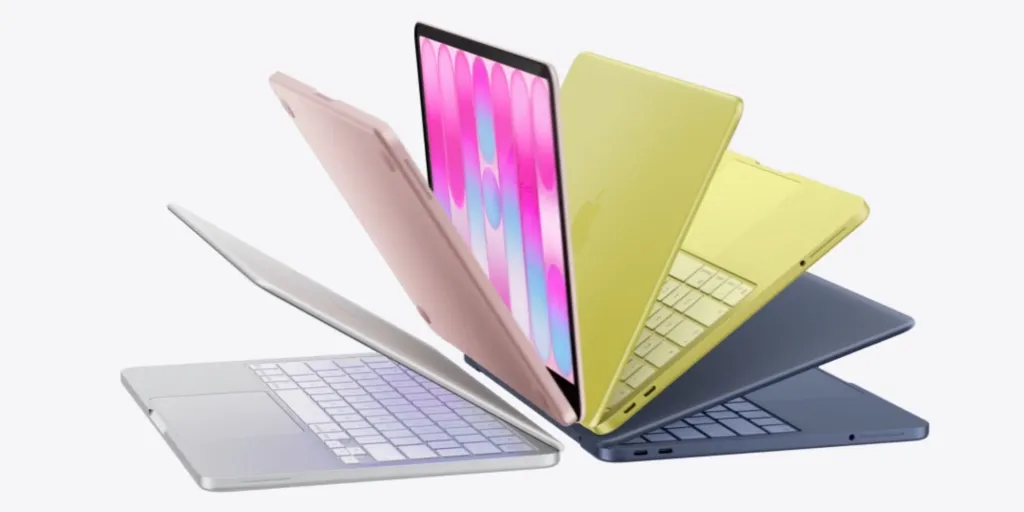
The Neo comes in silver, blush, citrus, and indigo. The Air still has silver, sky blue, starlight, and midnight. The Neo's colors are brighter more saturated than the Air's subtle tones.
For designers: It handles UI/UX design, web design in Figma, light photo editing, and wireframing. It struggles with heavy Photoshop work, video editing, 3D rendering, and running multiple design apps simultaneously.
Good for: Web designers, UI/UX designers working in browser-based tools, graphic designers doing social media content. Skip if: You do print design with large files, video editing, 3D work, or run Adobe Creative Suite heavily.
MacBook Neo Pricing in India
| Model | Storage | Touch ID | Price |
|---|---|---|---|
| Base | 250GB | No | ₹69,900 |
| Higher | 512GB | Yes | ₹79,900 |
Student pricing: Check Apple's education store for discounts.
Bank offers: ₹3,000 instant cashback on American Express, Axis Bank, and ICICI Bank cards.
EMI: No-cost EMI available for 3 or 6 months. Works out to around ₹11,650/month for the base model.
Availability: Pre-orders started March 4. Shipping begins March 11 through Apple.com and Apple retail stores.
Why This Price Matters
For context: MacBook Air M5 starts at ₹1,19,900. That's ₹50,000 more.
Five years ago, if someone told you Apple would sell a MacBook for under ₹70,000 in India, you'd have laughed. Apple didn't compete in this segment. Their entry price was always around ₹1 lakh or more.
The ₹50,000-₹80,000 laptop market in India has been dominated by HP, Dell, Lenovo, ASUS. These brands sell thousands of laptops to students and first-time buyers every month because that's what people can actually afford.
Apple stayed out of this fight. Until now.
₹69,900 puts the MacBook Neo in direct competition with mid-range Windows laptops. That's a big shift.
MacBook Neo Specifications
Display
- Size: 13-inch Liquid Retina
- Resolution: 2408 × 1506 pixels
- Brightness: 500 nits
- Colors: 1 billion
- Anti-reflective coating
The display is good. Not MacBook Pro good, but significantly better than what you get on ₹70,000 Windows laptops. Colors are accurate, brightness is solid for indoor use, text is sharp.
Processor
- Chip: Apple A18 Pro (same as iPhone 16 Pro)
- CPU: 6-core
- GPU: 5-core
- Neural Engine: 16-core
This is the key cost-cutting decision. Instead of the M5 chip used in MacBook Air, Apple put an iPhone chip in the Neo.
Why? Manufacturing scale. Apple already makes millions of A18 Pro chips for iPhones. Using the same chip in a laptop brings the cost down significantly.
Performance: Apple claims 50% faster than Intel Core Ultra 5 laptops at the same price for everyday tasks. For browsing, office apps, streaming, light photo editing, it's more than enough.
What it can't do: Heavy video editing in 4K, serious 3D rendering, compiling large codebases. That's MacBook Air/Pro territory.
Memory & Storage
- RAM: 8GB unified memory (not upgradeable)
- Storage: 256GB or 512GB SSD
8GB RAM is the bare minimum for macOS. It'll handle daily use fine—multiple browser tabs, office apps, some photo editing. But if you run heavy apps or lots of virtual machines, you'll feel it.
256GB storage fills up fast if you store videos or large project files. The 512GB model at ₹79,900 makes more sense for most people.
Important: You cannot upgrade RAM or storage after purchase. What you buy is what you're stuck with.
Battery
- Rated life: Up to 16 hours
- Tested with web browsing and video streaming
- Fanless design (silent operation)
16 hours is legitimate. Apple's battery claims on MacBooks have historically been accurate. This means a full college day or work day without hunting for a charger.
Connectivity
- 2× USB-C ports (USB 3 on left, USB 2 on right)
- 3.5mm headphone jack
- Wi-Fi 6E
- Bluetooth 6
Two USB-C ports is tight. You'll need a hub if you want to connect multiple accessories while charging. The left port supports external displays; the right doesn't. No Thunderbolt. The A18 Pro doesn't support it, so you're limited to USB speeds.
Camera & Audio
- Camera: 1080p FaceTime HD
- Microphones: Dual with beamforming
- Speakers: Dual side-firing with Spatial Audio and Dolby Atmos support
Camera is fine for video calls. Not amazing, but better than most laptop webcams at this price.
Audio quality is surprisingly good. The speakers are loud and clear, much better than Windows laptops in this segment.
Design
- Colors: Blush, Indigo, Silver, Citrus
- Weight: 2.7 pounds (around 1.2 kg)
- Material: Aluminum body
- Keyboard: Magic Keyboard with large trackpad
- Touch ID: Only on 512GB model
The design is classic MacBook, aluminum body, clean lines, no unnecessary branding. It looks and feels premium in a way ₹70,000 Windows laptops don't.
The citrus color is new and bright. Blush and indigo are softer. Silver is the safe choice.
Missing on base model: Touch ID. You need to type your password every time. For ₹10,000 more, the 512GB model adds Touch ID, which is genuinely worth it for daily convenience.
Software
- Ships with: macOS Tahoe
- Apple Intelligence features included
- iPhone integration (iPhone Mirroring, Universal Clipboard, Continuity)
macOS is a solid operating system. If you're switching from Windows, there's a learning curve, but it's not steep.
Apple Intelligence features (writing tools, live translation) work well. iPhone integration is seamless if you already use an iPhone.
Can You Actually Do Design Work on MacBook Neo?
This is what matters if you're a designer or work in a creative agency.
What works well:
UI/UX Design in Figma Figma runs smoothly. The Neo handles complex design files with multiple artboards without lag. Browser-based tools like Figma, FigJam, and Miro work perfectly because they're optimized for web performance.
Web Design If you design websites in tools like Webflow, Framer, or Adobe XD, the Neo is fine. These are lightweight compared to traditional design software.
Wireframing and Prototyping Sketch, Balsamiq, InVision, all run well. The 13-inch display is big enough for design work, though you'll want an external monitor for serious projects.
Social Media Graphics Creating Instagram posts, LinkedIn graphics, or Twitter headers in Canva or simple Photoshop work—no issues. The display's color accuracy is good enough for digital-only design.
Light Photo Editing Editing JPEGs for web use, color correction, basic retouching, the Photos app and Lightroom handle this fine. You won't get the speed of an M5 chip, but it's workable.
HTML/CSS Work If you code alongside designing, VS Code runs smoothly. Basic front-end development is no problem.
What struggles:
Heavy Photoshop Work Large PSD files with 50+ layers will slow down the Neo. If you work with print-resolution files (300 DPI, CMYK), you'll feel the 8GB RAM limit. Applying complex filters or working with smart objects gets laggy.
Illustrator with Complex Vectors Simple logos and icons fine. But complex illustrations with thousands of anchor points, multiple artboards, or heavy effects will push the Neo too hard.
Video Editing Forget 4K editing. Even 1080p video editing in Final Cut or Premiere will be frustrating. Rendering takes forever. The A18 Pro chip isn't built for sustained heavy workloads like M5 is.
3D Design and Rendering Blender, Cinema 4D, or any 3D work is out of the question. The integrated GPU isn't strong enough.
Running Multiple Adobe Apps If your workflow involves Photoshop + Illustrator + InDesign open simultaneously, 8GB RAM won't cut it. You'll hit memory pressure and everything slows down.
Large InDesign Files Multi-page brochures or magazines with high-res images will struggle. InDesign is RAM-hungry.
The 8GB RAM Problem
This is the real limitation for designers.
Modern design work often means:
- Figma open with 3-4 tabs
- Chrome with 15+ tabs for references
- Slack for communication
- Spotify for music
- Maybe Photoshop or Illustrator
8GB RAM handles this, but barely. When you're pushing it, macOS starts using swap memory (your SSD), which slows everything down.
For professional design work where time is money, you'll feel this limitation daily.
Display Quality for Design
The 13-inch Liquid Retina display is solid:
- 500 nits brightness (good for color-critical work)
- P3 wide color gamut (covers most digital design needs)
- 2408 × 1506 resolution (sharp text and graphics)
Color accuracy: Good enough for digital design (web, social, UI/UX). Not calibrated for print work.
Size limitation: 13 inches is cramped for serious design work. You'll want an external monitor. The Neo supports one external display up to 6K.
Storage for Designers
256GB fills up fast with design files:
- Adobe Creative Cloud apps: ~15GB
- Figma desktop files: 5-10GB
- Font libraries: 3-5GB
- Project files, references, assets: 50-100GB easily
Recommendation: If you're buying for design work, the 512GB model at ₹79,900 is mandatory. Even then, you'll need external storage or cloud storage.

What You Can Actually Do With It
Works well for:
- Web browsing (Chrome, Safari, Firefox)
- Office apps (Pages, Word, Excel, Google Docs)
- Email and messaging
- Video calls (Zoom, Meet, Teams)
- Streaming (Netflix, YouTube, Prime Video)
- Light photo editing (Photos app, Lightroom)
- Coding in lightweight editors (VS Code for simple projects)
- Music production basics (GarageBand)
Struggles with:
- 4K video editing in Final Cut or Premiere
- Heavy Photoshop work with large files
- 3D modeling and rendering
- Running Windows via Parallels
- Compiling large software projects
- Gaming (not a gaming laptop)
- Multiple virtual machines
If your work involves any of the "struggles with" tasks regularly, save up and buy the MacBook Air M5 instead. The M5 chip makes a real difference for professional workloads.
Who Should Buy MacBook Neo
Web Designers & UI/UX Designers
If you primarily work in Figma, Webflow, or browser-based design tools—the Neo works. Your workflow doesn't need massive RAM or processing power. The 16-hour battery is perfect for working from cafes or client meetings.
Worth it if: 90% of your work is UI/UX design or web design. You use cloud-based tools. You work on digital-only projects.
Skip if: You regularly switch between Photoshop, Illustrator, and InDesign. You need to run multiple heavy apps simultaneously.
Freelance Graphic Designers (Social Media Focus)
If you design social media content, simple marketing graphics, or basic branding—the Neo handles it. Instagram posts, LinkedIn carousels, email graphics don't need a powerful machine.
Worth it if: Your clients are small businesses needing social content. You're not doing print work. You deliver JPGs and PNGs, not print-ready files.
Skip if: You do brand identity work with complex logo systems. You work with print vendors. Your files are large and multi-layered.
Junior Designers & Design Students
If you're learning design or starting your career, the Neo is a reasonable entry point into the Mac ecosystem. You'll learn the tools and can upgrade when you're earning professional rates.
Worth it if: You're in design school or just starting freelancing. You can't afford ₹1,19,900 for a MacBook Air. You primarily learn through online courses and practice projects.
Skip if: Your college/work requires specific software that needs more power. You're already working with paying clients regularly.
Marketing Professionals
If you create presentations, edit images for blogs, make simple graphics, and don't consider yourself a "designer" the Neo is more than enough. Most marketing work doesn't need professional-grade hardware.
Worth it if: Design is 20% of your job. The rest is writing, strategy, analytics, meetings. You need a reliable laptop that lasts all day.
Who Should Skip MacBook Neo
Professional Designers Billing Clients
If you charge ₹25,000+ per project or have monthly retainers, don't buy the Neo. Your time is valuable. The slowdowns from 8GB RAM and A18 Pro chip will cost you more in wasted time than the ₹50,000 you save vs MacBook Air.
A professional designer charging ₹2,00,000/month can't afford to wait 5 extra minutes for each render or deal with lag when switching between apps.
Math: If the Neo wastes 30 minutes per day due to performance issues, that's 10 hours per month. If your time is worth ₹2,000/hour, you're losing ₹20,000/month. The MacBook Air pays for itself in 3 months.
Print Designers
If you prepare files for print, brochures, magazines, packaging, posters you need proper color calibration and power to handle high-res CMYK files. The Neo's display isn't calibrated for print work, and 8GB RAM struggles with large InDesign files.
Video Editors & Motion Designers
Even basic video editing is painful on the Neo. If you edit client videos, create motion graphics, or do any After Effects work, this laptop will frustrate you daily. Save up for the Air or Pro.
Agency Designers
If you work at a design agency where speed matters and you're juggling multiple client projects with tight deadlines the Neo will slow you down. Agencies should invest in proper tools for their teams.
Anyone Doing 3D Work
Blender, Cinema 4D, SketchUp with rendering forget it. The integrated GPU can't handle 3D work.
MacBook Neo vs Windows Laptops at ₹70,000
At ₹70,000, you can get Windows laptops with:
- Intel Core i5 or AMD Ryzen 5
- 16GB RAM
- 512GB SSD
- Dedicated graphics (sometimes)
- More ports
- Upgradeable RAM and storage
So why choose MacBook Neo?
Battery life: Windows laptops at this price get 6-8 hours max. Neo gets 16.
Build quality: Plastic vs aluminum. The difference is obvious.
Trackpad: MacBook trackpads are unmatched. Windows trackpads at this price are terrible. Display: Better color accuracy and brightness than budget Windows laptops.
Silent operation: Fanless means no noise. Ever.
Integration: If you use iPhone, AirPods, iPad everything works together seamlessly.
Longevity: Macs get software updates for 7+ years. Budget Windows laptops slow down in 2-3 years.
The tradeoff is less RAM and fewer ports.
MacBook Neo vs MacBook Air M5
MacBook Air M5 starts at ₹1,19,900 that's ₹50,000 more.
What the extra ₹50,000 gets you:
- M5 chip (significantly faster)
- Better performance for professional work
- Supports external displays better
- Thunderbolt ports
- MagSafe charging
- Longer software support (likely)
When to spend the extra money: If you're using this laptop for work that earns you money, the Air is worth it. If you're doing creative work professionally, coding for a living, or running resource-intensive apps, Air makes sense.
When to save the money: If you're a student, or your work is web-based, or you just want a laptop for personal use the ₹50,000 difference is hard to justify.
The Real Cost of Ownership
Upfront cost
- MacBook Neo 256GB: ₹69,900
- MacBook Neo 512GB: ₹79,900
Add-ons you might need
- USB-C hub (for extra ports): ₹2,000-₹5,000
- External mouse: ₹1,500-₹3,000
- Laptop sleeve/case: ₹1,000-₹2,500
- AppleCare+ (extended warranty): ₹16,900 for 3 years
Long-term value
Macs hold resale value better than Windows laptops. After 3 years, you can still sell a MacBook for 40-50% of original price. Windows laptops at this price drop to 20-30%.
If you buy the Neo for ₹70,000 and sell it after 3 years for ₹30,000, your actual cost is ₹40,000 (₹13,333/year). That's reasonable.
FAQs
At ₹69,900, the MacBook Neo is Apple's most accessible laptop in India. But "accessible" doesn't mean "right for professional design work."
At Klient Authority, we run MacBook Pros for our design and development team because we can't afford slowdowns when working on client projects. Tools are an investment, not an expense.
If you're buying your first Mac for design work and ₹70,000 is your absolute budget, the Neo will get you started. But plan to upgrade to the Air or Pro within 2 years as your skills and client work grow.
Pre-orders are open. Shipping starts March 11. If you're buying for design work, get the 512GB model with Touch ID for ₹79,900, the extra storage and convenience are non-negotiable.
Need help building a design system or website for your business? At Klient Authority, we handle web design, SEO, and digital strategy for growing companies. We use the right tools to deliver work that actually performs. Get in touch to see how we can help.
Share this article
Follow us
A quick overview of the topics covered in this article.
Latest articles

October 17, 2026

October 17, 2026

October 17, 2026