


Have you ever wondered why your business doesn't show up when people search for your services online? Or why your phone isn't ringing even though you know people need what you offer?
In most cases, the problem isn't competition or bad luck. It's a handful of simple local SEO mistakes that quietly push your business down in Google search results.
These mistakes aren't technical or complicated. They're easy to miss — and once they're fixed, businesses often see real improvements in visibility, calls, and enquiries.
Below are the five most common local SEO mistakes we see hurting small businesses, along with clear explanations and practical fixes for each one.
Why These Simple Local SEO Mistakes Cost You Real Money
When someone searches for a local service, they usually choose one of the first few results.
Research from Advanced Web Ranking shows that the top three Google results receive over 50% of all clicks combined. If your business isn't visible in those positions because of avoidable local SEO mistakes, those clicks — and customers — go to competitors instead.
And those customers don't come back to search again. They call whoever shows up first.
Mistake #1: Using Fake Review Systems That Violate Google's review Policy
Some businesses try to game the system by only asking happy customers to leave Google reviews.
They use software that first asks customers if they had a good experience.
If the answer is "yes," the customer is sent to Google to leave a review.
If the answer is "no," the feedback is hidden privately.
It sounds smart. In reality, it's one of the fastest ways to destroy your local rankings.
Why This Hurts Local Rankings
Google reviews are a local ranking factor and a major signal of prominence in the local map pack.
Google can detect fake or filtered review patterns by analyzing:
- Review timing (too many at once)
- Similar wording
- New Google accounts leaving reviews
- Abnormal rating distribution
When Google catches manipulation, it doesn't just remove fake reviews — it can remove all reviews.
We worked with an HVAC company that lost 180 Google reviews overnight due to filtered review software. Their inbound calls dropped by 73% almost immediately, and it took over a year to recover.
The Right Way to Get Reviews
- Ask every customer for an honest review
- Send a direct Google review link
- Do not filter or gate reviews
- Respond professionally to negative reviews
Studies from Northwestern University show customers trust businesses with ratings between 4.2–4.5 stars more than perfect 5.0 ratings. A few honest negatives actually build trust.
Mistake #2: Your Website Doesn't Work Properly on Mobile Devices
More people search for local businesses on their phones than on computers. According to Google research, 53% of mobile users will leave a website that takes more than 3 seconds to load.
Think about your own behavior. When you're on your phone looking for a restaurant or plumber, do you wait around for a slow website to load? Of course not. You hit the back button and try the next result.
The Test You Need to Do Right Now
Pull out your phone. Go to your website. Time how long it takes to load completely.
Now try these things:
- Can you read the text without zooming in?
- Can you tap your phone number to call?
- Are the buttons big enough to press easily?
- Does your contact form work smoothly?
If any of these things don't work well, you're losing customers every day.
How to Fix Your Mobile Website
Make Images Smaller: Use tools to compress your photos so they load faster. You can use free tools like TinyPNG.
Test Everything: Check that your phone number is clickable, your forms work, and people can navigate easily.
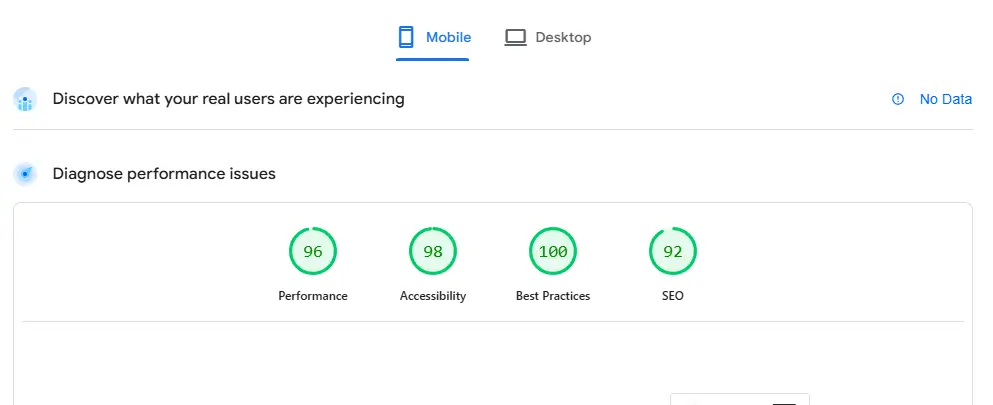
Use Google's Free Tools: Google PageSpeed Insights will test your website and tell you exactly what's wrong and how to fix it.
One contractor I worked with had a website that took 11 seconds to load on mobile. After we fixed it to load in under 3 seconds, his phone calls from the website increased by 340%.
Mistake #3: Having Different Business Information Everywhere Online
Your business name, address, and phone number need to be exactly the same everywhere online. I mean exactly the same. If Google sees "123 Main Street" on your website but "123 Main St" on Yelp, it gets confused about which one is right.
According to research from Neustar Localeze, 76% of people lose trust in a business when they find different contact information online.
Where This Problem Hides
Your business information appears in way more places than you think:
- Your website
- Google Business Profile
- Yelp
- Better Business Bureau
- Yellow Pages
- Industry directories
- Chamber of Commerce listings
The problem happens when you update your info in some places but forget about others. Maybe you moved locations and updated Google and your website, but forgot about your old Yelp listing.
How to Fix This Problem
Step 1: Pick one "master" version. Use whatever information you have on your Google Business Profile as your standard. Write it down exactly as it appears there.
Step 2: Find everywhere you're listed. Google your business name and make a list of every website where your business appears.
Step 3: Update everything to match. Contact each website and update your information to match your Google listing exactly.
Step 4: Start with your website. Make sure your website footer has the exact same name, address, and phone number as your Google listing.
One HVAC company we helped had 47 different versions of their business information online. After we fixed all of them to match exactly, their local Google rankings went up by 30% in just six weeks.
Mistake #4: Not Using Schema Markup That Helps Google Understand Your Business
There's a type of code called "schema markup" that you can add to your website. This code tells Google exactly what your business does, when you're open, what services you offer, and other important details.
Without this code, Google has to guess what your business is about. With the code, you're giving Google a clear instruction manual.
Why This Matters
When you use this special code, your business can show up in Google searches with extra information like:
- Your star rating
- Your hours
- Your phone number
- Your services
- Your address
According to Search Engine Land, businesses with these enhanced listings get about 36% more clicks than regular listings.
What Your Google Listing Looks Like With and Without Schema Markup
Without the code:
With the code:
The second one takes up way more space and gives people more reasons to click on your business.
How to Add This Code
Option 1: Use Google's Free Tool Google has a free tool called "Schema Markup Helper" that creates this code for you. You just enter your website, highlight your business information, and it makes the code.
Option 2: Ask ChatGPT You can ask ChatGPT to write this code for you. Just say: "Write schema markup code for my plumbing business. Include my address, phone number, services, and hours."
We helped a dental office in Austin add this special code to their website. Within 3 months they were ranking #1 for 45 different dental searches. Their website clicks went up 67% and they got 89% more appointment bookings.
Mistake #5: Never Checking the Data Google Gives You for Free
Google gives you detailed information about how people find your business online. It shows you exactly what words people typed into Google before they found you, how many people saw your business, and what they did after finding you.
According to BrightLocal, 84% of local businesses never look at this information.
What This Free Data Tells You
When you log into your Google Business Profile, you can see:
- What words people searched for when they found your business
- How many people saw your business listing
- How many people clicked on your website
- How many people called your phone number
- How many people asked for directions
How to Use This Information to Get More Customers
Find Your Best Keywords: Look at which search words bring you the most phone calls and website visits. Use these words more often on your website.
Spot Missed Opportunities: Sometimes lots of people see your business for certain searches, but hardly anyone clicks. This tells you that you need to improve how your business appears for those searches.
Create Content People Actually Want: If people are searching for "emergency plumber near me" and finding your business, make sure your website has a page about emergency plumbing services.
Real Example
We worked with a Real-estate agency in Seattle. When we looked at their Google data, we found that 847 people saw their business when searching for "Seattle Real estate agency," but only 23 people actually clicked.
We created a new page on their website about Real-estate agency Seattle. We also updated their Google Business Profile to include pricing information.
Within 2 months:
340% more people clicked when they searched for "Seattle Real-estate agency"
They got 67% more leads from their Google listing
The extra business was worth $89,000 to them
How to Fix All These Problems in 30 Days
Week 1: Stop the Bad Stuff
- Days 1-2: Stop using any software that filters reviews. Start asking all customers for honest reviews.
- Days 3-4: Write down your exact business information from Google Business Profile. Search Google for your business and note every different version you find.
- Days 5-7: Test your website on your phone. Write down everything that doesn't work well.
Week 2: Fix the Basics
- Days 8-10: Update your website to match your Google Business Profile exactly. Fix any other websites that have different information.
- Days 11-14: Make your website work better on phones. Compress images, make your phone number clickable, and test your contact forms.
Week 3: Add the Advanced Stuff
- Days 15-17: Use Google's Schema Markup Helper or ChatGPT to create special code that tells Google what your business does.
- Days 18-21: Check your Google Business Profile insights. Find the search words that bring you business and ones where you're missing opportunities.
Week 4: Create Content and Keep Monitoring
- Days 22-24: Write new content for your website based on what people are actually searching for.
- Days 25-30: Set up a monthly routine to check your Google insights, test your website on mobile, and make sure your business information stays consistent.
Why You Need to Fix These Problems Now
Every day you wait, your competitors get further ahead. The businesses showing up at the top of Google aren't necessarily better than you – they just fixed these simple problems.
If you're not in the top 3 results because of these mistakes, you're missing out on customers every single day. Those customers are going to your competitors instead.
The good news? These problems are all fixable. Pick one mistake and fix it completely before moving to the next one. Small improvements add up to big results over time.
Your customers are searching for your services right now. The question is: will they find your business or someone else's?
Start with whichever mistake seems easiest for your situation, but don't wait. Your next customer might be searching for you right now, and these simple fixes could be the difference between them calling you or calling your competitor.
Share this article
Follow us
A quick overview of the topics covered in this article.
Latest articles

March 22, 2026

March 22, 2026